
I always liked the idea of UI test automation. In practice, it never quite worked for me: the tests were flaky, expensive to maintain, and covered too few scenarios with too few assertions.
I’ve wanted to use agents for testing ever since they came along. Some teams made strides as early as 20241, but for me, it wasn’t practical until recently. Now cheaper models like Sonnet are capable enough and handle long contexts, and Xcode 27’s MCP server lets them drive the simulator. So for Pocket Casts, I finally built what I always wanted: a comprehensive regression suite with tests that cost practically nothing to maintain, after some upfront investment.
Scenarios, Not Scripts
The tests are Markdown (because of course). Each scenario says what must be true, not how to check it:
## Clear from the mini player
tags: destructive
setup: `--fixture up-next:3`

- The mini player's "Close and Clear Up Next" asks for confirmation before
  clearing, like the Clear button in Up Next
- After clearing, the mini player goes away and the Up Next tab shows its
  empty state
The agent works out the steps itself. The setup line runs a DEBUG-only launch hook that fills Up Next with three episodes, so it doesn’t spend time getting there. There are 104 scenarios now across 13 areas.
That also takes care of maintenance. With no selectors or step code, a redesigned screen doesn’t break anything: a scenario only changes when the behavior it describes does. And it takes care of most of the flakiness. The agent reads the screen before it taps, so a slow load or an unexpected alert doesn’t fail a test the way a hard-coded wait would. The agents also flag whatever else looks off along the way, like an exploratory tester would, and that’s where many of the findings come from.
A run also sweeps the main screens under combined settings: dark mode with Increase Contrast, the largest text size with Bold Text, right-to-left with long strings, and German with Reduce Motion. Each screen under each setting is a test case of its own, and these sweeps make up about half of the 204 test cases in the November 7 run.
One Command
Before every Pocket Casts code freeze, I run one command in Claude Code: /pocket-qa ios full. It’s a skill: instructions in Markdown, plus scripts the agents wrote. The agents drive the app with the DeviceInteraction tools from Xcode 27’s MCP server. There’s no XCUITest target2 and no other test framework. Here’s what full does:
- Fresh simulators. Four iPhones and an iPad are created for the run and deleted at the end, so there are no template devices to maintain.
- Test accounts. Each simulator signs in to its own test account, with the password from the Keychain. A separate skill creates the accounts, seeds them with podcasts, playlists, and bookmarks, and resets each one before every batch, so destructive scenarios are harmless.
- Small batches. Each agent runs three scenarios, then hands over to a fresh one. Every turn re-reads the whole context, so six scenarios per agent cost 1.5× as much per scenario.
- Recording. Every simulator is recorded for the whole run, so any issue can get a clip with the steps and log lines next to it.
Sonnet drives and verifies, and the five simulators pack nine hours of agent time into about two. It’s relatively cheap too: a full run uses about 2% of my weekly limit on the Ultra plan, or about $120 at API prices (rough estimate).
Trust, but Verify
The agents driving the app only log candidates. A second agent, the verifier, checks each one, collects more evidence, like the cause in the code, and looks for duplicates in Linear.
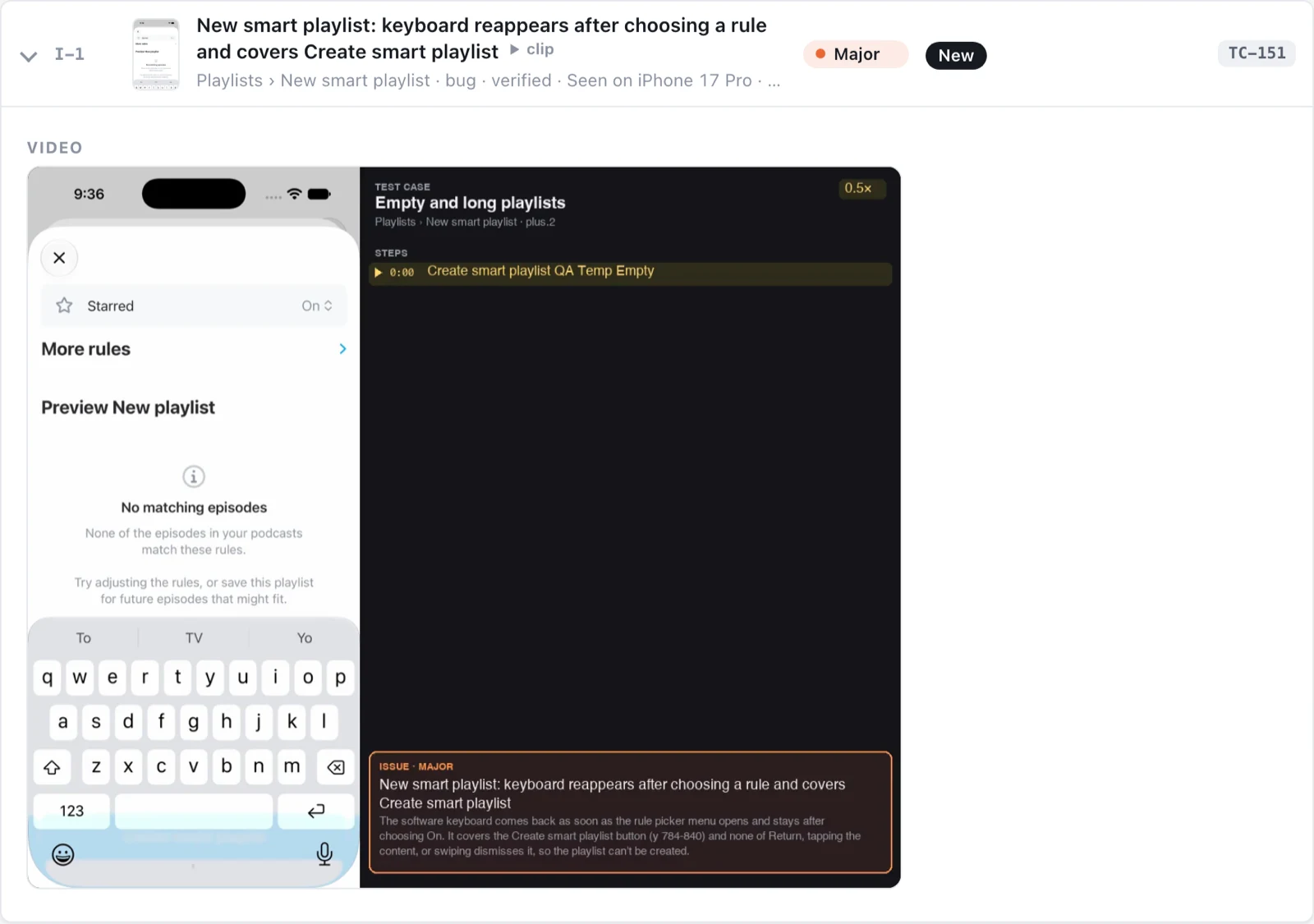
Take one of the three new major issues. An agent was checking how an empty smart playlist looks. It picked a rule, and the keyboard came back over the Create smart playlist button and wouldn’t go away, so the playlist couldn’t be created. The scenario never mentions the keyboard. The verifier found the cause: the name field becomes first responder when the sheet appears, and nothing resigns it.
It’s the same idea as in Bring Receipts: every issue comes with as much evidence as possible.
The Report
Everything ends up in a single HTML file that opens with a verdict and the major issues. It uses our design system, and there’s something warm and fuzzy about a report that looks like Pocket Casts instead of a generic one:
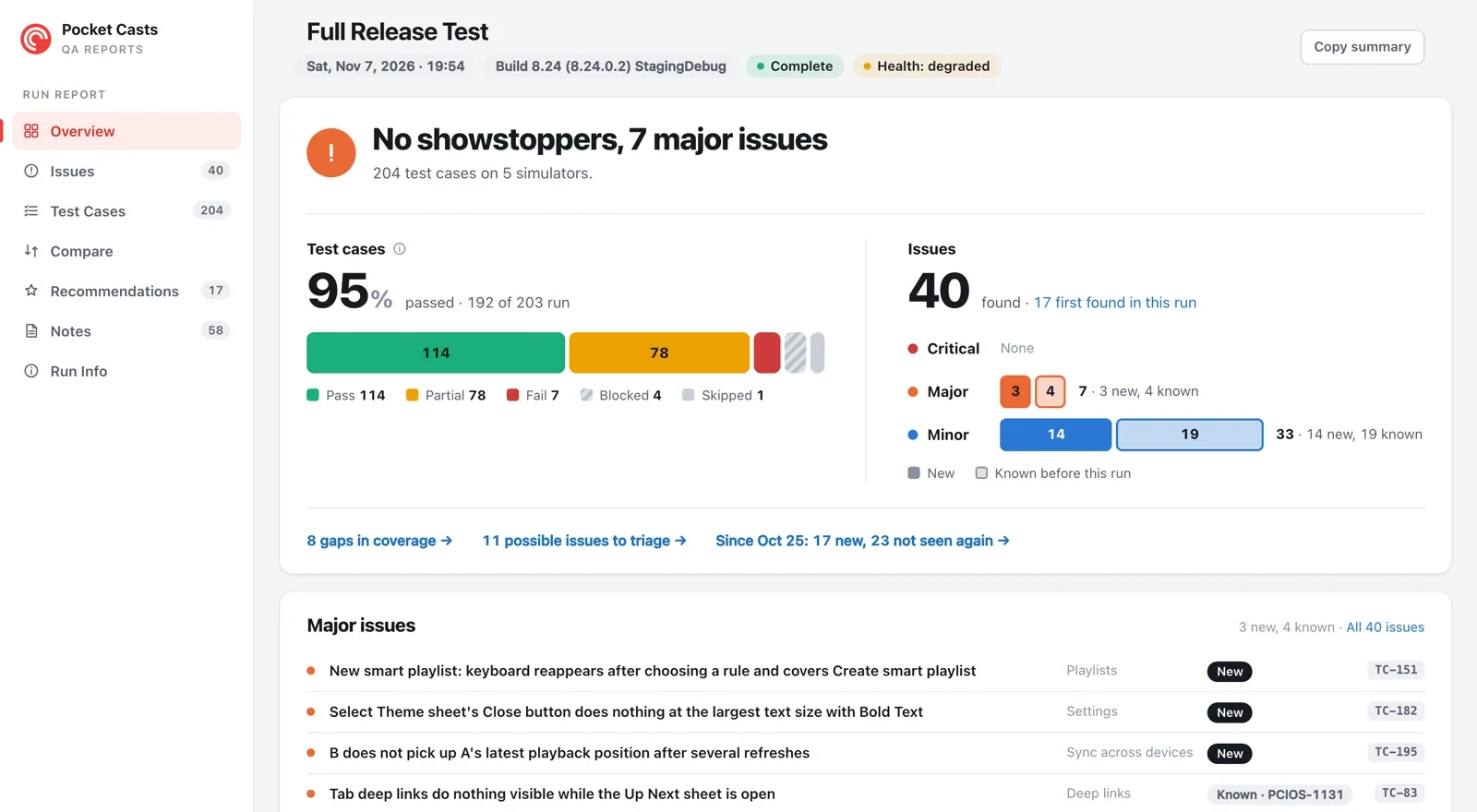
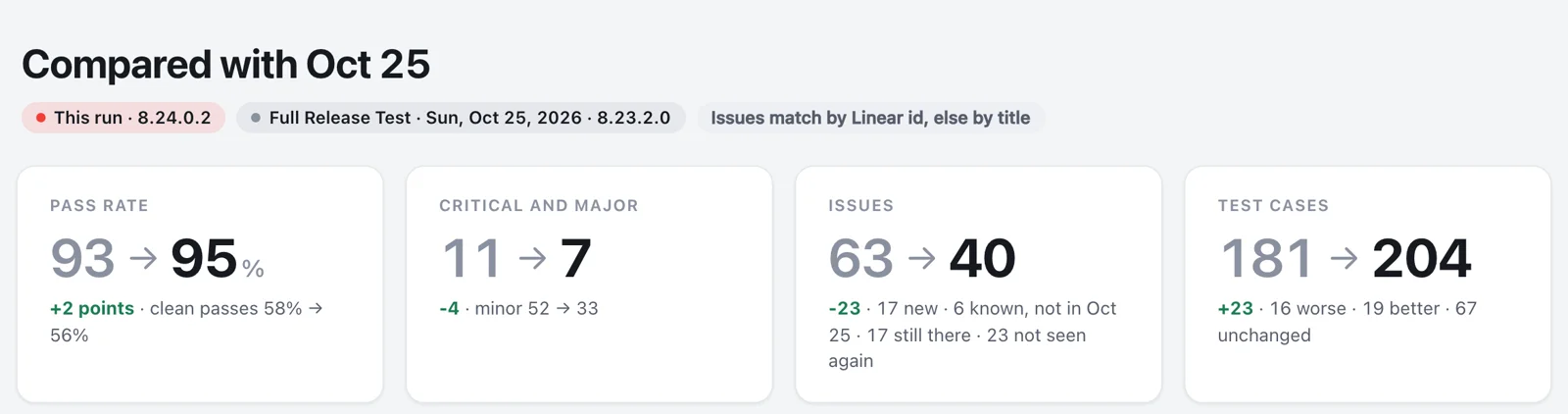
Two parts are the most useful to me. Each issue lists every test case that ran the same check, so you can tell right away that a bug only happens at the largest text size with Bold Text. And each run is compared with the previous one, so you can see if the release is getting better or worse3:
Nothing goes to Linear automatically. I go through the report, do a quick triage, and file the issues with another skill, screenshots and clips included. Some turn out to be false positives, and I update the scenarios accordingly.
The same skill now tests the Android app too. It needed only emulators instead of simulators,
adbinstead of the Xcode MCP server, and a Kotlin port of the launch hooks. The scenarios are shared, and the first full run found 60 issues across 191 test cases. Going forward, every release will get both an iOS and an Android run.
Should You Do It?
It’s an emerging practice: Android Studio’s Journeys and Firebase’s App Testing agent are both in preview, though Xcode has nothing like them yet. What changed for me is that I actually trust the agents now: they’re consistent from run to run, and they rarely make mistakes. It has limits, though:
- It’s not deterministic. That’s good for coverage, but you can’t gate a merge on it, so unit tests stay.
- It’s slow. Nine agent-hours is too much for every commit. For a single PR,
/pocket-qa ios verify <PR>tests only what the diff touches and its neighbors. - It runs on simulators and emulators. A full run doesn’t use real devices4, so there are no real network conditions or purchases.
What it does well is the long tail: every scenario, including the obscure ones, at settings nobody checks by hand. So, should you do it? If someone on your team still goes through a checklist before every release, yes. That checklist is most of the way to being scenarios already.
What’s Next
Ideally, a run covers as many scenarios and checks as is computationally possible. This is only the skill’s third iteration, and I still have room to spare, both to add more and to optimize. Next, I plan to double the scenarios: maintenance is cheap, and thanks to sharding, a run scales linearly with the number of tests. What I don’t plan to do is go back to traditional UI test automation.
Out there is the perfect release. No issues. Every scenario, every test case. Perfect. You see it?
References
- Journeys for Android Studio (Android Developers)
- DragonCrawl: Generative AI for High-Quality Mobile Testing (Uber)
- AI-powered UI testing (Thoughtworks Technology Radar)
- The Practical Test Pyramid (Ham Vocke)
- Building effective agents (Anthropic), for the evaluator pattern behind the verifier
-
For example, Uber runs its DragonCrawl agent before every release of its Android apps. ↩
-
Not in the app project, at least. A recent addition: a full run now also includes XCUITest’s accessibility audit (
performAccessibilityAudit) on the main screens, using a small runner the skill builds itself. I’m also exploring XCUITest for testing certain things. ↩ -
Many of these issues are super minor, and even though code is cheap now, prioritization is still a thing. I hope to see zeroes in the near future! ↩
-
It could, though: the DeviceInteraction tools and
adbboth work with real devices. ↩